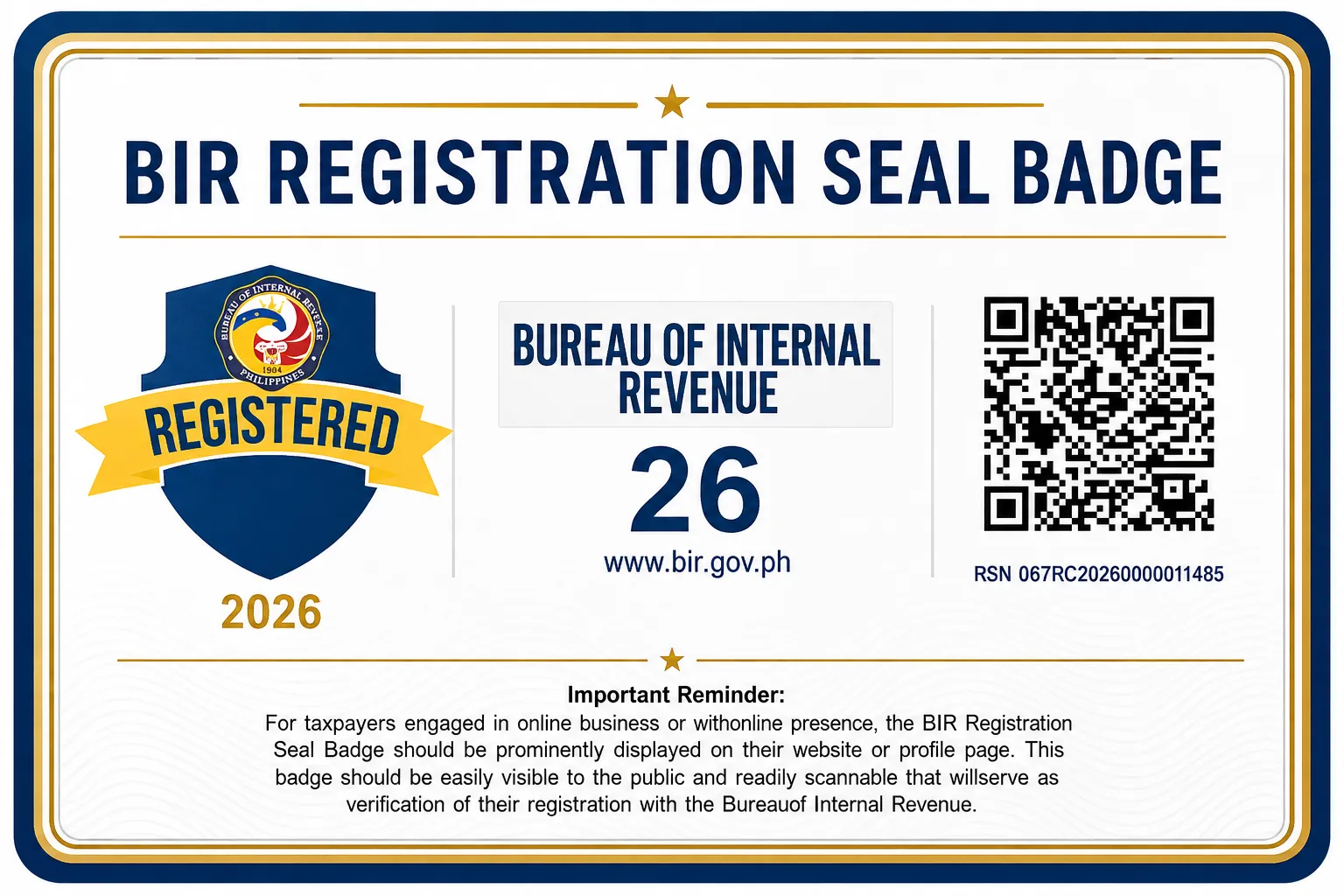
An offline shop posts its Certificate of Registration on the wall. In 2026, an online business posts something new instead: a QR-coded BIR Registration Seal Badge on its storefront and channels.
Introduced under RMC 38-2026 and made self-service in ORUS by RMC 64-2026, the badge is the online equivalent of displaying your COR, redesigned so you can prove you are registered without exposing your private details. This guide covers what it is, who needs it, how to generate it, and where to put it.
Key Takeaways
- The Registration Seal Badge is a QR-coded image online earners must display, under RMC 38-2026.
- You post it in place of your full COR, so it hides your TIN and home address while proving you are registered.
- You generate it yourself in ORUS, and downloading the QR-coded COR carries a P30 documentary stamp tax.
- It covers online sellers, e-commerce shops, and creators such as vloggers, streamers, and influencers.
- Display it conspicuously on your storefront, app, website, and channels, not in a private dashboard.
The Complete BIR Registration Process
The full path from unregistered to filing. Grey steps are for everyone; tagged steps apply to specific registrants.
Sole proprietors start here
Register your business name (DTI)
Register your trade name in the DTI BNRS. Valid five years.
Barangay clearance and Mayor's Permit
Local clearances for a physical business, secured before the BIR.
The BIR process, for everyone
Secure or update your TIN
One TIN for life. If you had a job, transfer your RDO with Form 1905.
File BIR Form 1901
Apply at the New Business Registrant Counter, by email via NewBizReg, or online via ORUS.
Pay the P30 DST
The only fee at registration. The P500 annual fee was abolished in 2024.
Get your COR (Form 2303)
Your certificate of tax types. You choose 8% or graduated here.
Register your books of accounts
A journal and ledger, manual, loose-leaf, or through ORUS.
Get an ATP, then invoices
Form 1906, printed by a BIR-accredited printer, or a registered e-invoicing setup.
Online earners add this
Display your Registration Seal Badge
A QR-coded badge on your storefront and channels, generated through ORUS.
File and pay your taxes, every quarter
Registration is one-time. Filing is the ongoing part. This is where you go next.
What the Badge Is
The Registration Seal Badge is a standardized image issued by the BIR that carries a QR code. Scanning it links to the BIR's verification system and confirms that the business is registered. Crucially, it does this without exposing the sensitive details on your full certificate, such as your TIN and residential address.
That privacy fix is the reason it exists. Requiring online sellers to post their entire COR would publish personal information across the internet. The badge lets a customer confirm you are legitimate while keeping your private data off your public pages. You display it in lieu of the COR or eCOR.
Who Must Display It
Under RMC 38-2026, the requirement reaches taxpayers with an online presence, which is a wide net:
- Online marketplace sellers and merchants on e-commerce platforms.
- E-commerce shops and businesses selling through websites or mobile apps.
- Content creators such as bloggers, vloggers, and live streamers.
- Influencers and individuals earning from online views, advertisements, affiliate commissions, and brand sponsorships.
If you register as an online seller or content creator, this applies to you. A freelancer who transacts through a website or monetized channel is also covered.
How to Generate It in ORUS
RMC 64-2026 lets existing COR holders generate the badge themselves through ORUS. The sequence is short.
Generate the Badge, Step by Step
Per RMC 64-2026, for taxpayers with a COR and no changes to their registration.
Log in to ORUS
Sign in, or create an ORUS account if you are not yet enrolled.
Synchronize your record
Open your Profile and click Synchronize to update your registration record.
Open Certificates and Permits
Navigate to the Certificates and Permits section.
Download COR and badge
Download your latest COR with QR code together with your Registration Seal Badge. Pay the P30 DST online and keep the proof.
Display the badge
Post it conspicuously on your storefronts, app, website, and channels.
The P30 is the documentary stamp tax on the certificate under Section 188 of the Tax Code, paid through a BIR ePayment channel. The badge generation itself does not add a separate fee.
Where to Display It
The badge only works if the public can see it. Post it where customers actually look before they buy or transact.
Good placements
Your online marketplace seller or merchant page, your e-commerce store details or About page, your mobile app's business or support section, your website footer or contact page, and your creator profile headers and channels. Anywhere a customer checks whether you are legitimate.
Do not bury it in a private seller dashboard that only you can see. The point is public verification, so it has to be publicly visible.
Why It Is Worth Displaying
Beyond being required, the badge does real work for you. It verifies your BIR registration at a glance, it enhances public trust and credibility with buyers wary of scams, and it makes your registration information verifiable through the QR code without any back-and-forth. For an online business competing against anonymous sellers, a scannable proof of legitimacy is a genuine advantage.
Find a Digital Marketing Agency Near You
Prefer to hand this off? These providers are listed in the azifind directory. Compare and shortlist before you commit.
Deloitte Philippines (Cebu office)
Philippines
Diaz Murillo Dalupan and Company Cebu Branch
Philippines
DMA Global Accounting Services Co.
Philippines
Espina Perez- Espina & Associates
Philippines
FCO Accountants
Philippines
Hermosada & Co., CPA's
Philippines
Lily Villamala Ceniza and Associates ( LVCA )
Philippines
MB&A CPAS
Philippines
Mora, Sanchez, Meñoza and Associates or MSMA (formerly R. P. Mora & Co.)
Philippines
R Talaba Accounting Firm
Philippines
Common Mistakes to Avoid
The most common is posting the full COR online instead of the badge. That publishes your TIN and address needlessly, which is exactly what the badge was created to prevent.
The second is skipping the synchronize step in ORUS. Without it, your record may not be current and the badge and QR-coded COR will not generate correctly.
The third is hiding the badge where only you can see it. If it is not on your public storefront or channel, it does not meet the display requirement.
The fourth is assuming it replaces registration. It does not. You must already hold a COR to generate a badge, so this comes after you complete registration.
One Last Thing
The Registration Seal Badge is a small task with an outsized payoff: one ORUS session turns your BIR registration into a scannable trust signal that customers recognize. Generate it once you hold your COR, post it where buyers can see it, and you have satisfied the requirement while giving your online business a visible mark of legitimacy. If you have not registered yet, start with BIR new business registration, then come back here.
Frequently Asked Questions
Who must display the BIR Registration Seal Badge?
Taxpayers with an online presence. Under RMC 38-2026, online marketplace sellers, e-commerce shops, and people offering services or earning online, including bloggers, vloggers, live streamers, content creators, and influencers earning from views, ads, affiliate commissions, or sponsorships, must display the badge on their online pages.
Is displaying the badge mandatory?
Yes. RMC 38-2026 requires covered online earners to post the Registration Seal Badge on their storefronts and channels. It is displayed in lieu of the Certificate of Registration or eCOR, so it is the online equivalent of the old requirement to post your COR at your place of business.
How do I get the Registration Seal Badge?
You generate it yourself through ORUS. Log in, synchronize your registration record from your Profile, open the Certificates and Permits section, and download your latest COR with QR code together with the Registration Seal Badge. You pay a P30 documentary stamp tax through a BIR ePayment channel and keep the proof.
Does the badge cost anything?
The badge itself is generated at no separate charge, but downloading your latest QR-coded COR through ORUS carries a P30 documentary stamp tax under Section 188 of the Tax Code, paid online. Keep the proof of payment.
Does the badge replace my Certificate of Registration?
For public display online, yes. You post the QR-coded badge instead of your full COR, which protects sensitive details like your TIN and home address while still letting customers verify you are registered. You still keep your actual COR for your records and for transactions that require it.
Where exactly do I display it?
Conspicuously, where customers can see it: your online marketplace seller or merchant page, e-commerce store details, mobile app, website, and your creator profiles and channels. It should be visible to the public, not hidden in a private seller dashboard.
Badge posted? Get found off-platform too
Your seal badge proves you are registered. A listing helps buyers discover you beyond the marketplace. Claim or add your free listing on azifind to appear on the city and category pages people use to find businesses like yours.